

Curiosity kills Cheesie. Yes yes yes you all want to know. Yes yes yes i will post the “before” pictures. But if i don’t blog tomorrow, means you all have killed me already. Please pool some funds and buy me a nice spot in Nilai Memorial Park.
Granted. I’ve decided that everyone is entitled to impeccable porcelain skin, super thick eyelashes, smooth, silky, glossy hair, spare-tyre-free abs and mile-long legs.
Therefore. For those who have yet to realize the power of digital surgery, i’m here to show how you may stretch your legs to whatever extent you like. Literally.
Truth to be told. My face was naked when i took the pictures, because i was in a hurry to get the blog post done (while my ideas are still flesh and while i still naively believed that it’s plausible for me to look like the hottest Taiwanese vain-pot singer), so i didn’t bother to even put a scrap of make up on my face.
Yes you read it right. All make up was done digitally. Amazing, isn’t it?
Ok. View at your own cheesretion.
Let’s skip a few steps and start with the one with digital make up on my face already (sorry i can’t show my naked face. Bad skin week. Unless you wanna see the breakfast you ate this morning, on your computer keypad again).
.
.
.
.
.
.
.
.
The BEFORE picture.
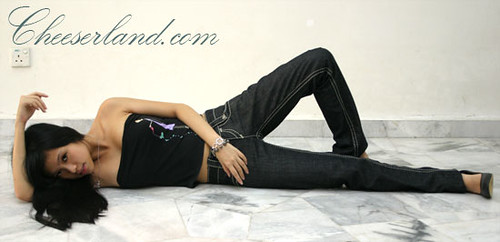
Oh yea my legs are shorter than Paris Hilton’s miniskirt.
Step 1: The Basics
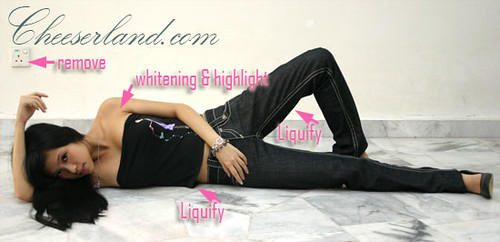
1. Remove any potong steam object with Stamp Tool.
2. Liposuction. Remove excess fat on any part you like with Liquify.
3. Whiten skin and with Replace Color and hue & saturation
Result:
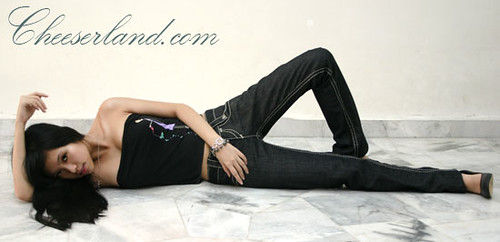
Step 2: Enhancement
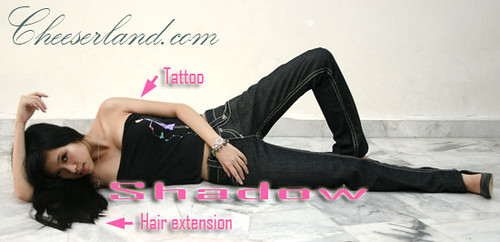
1. Add a tattoo using Art Brushes.
2. Adjust lighting using Burn to create shadows.
3. Create Hair extension using Hair Brushes.
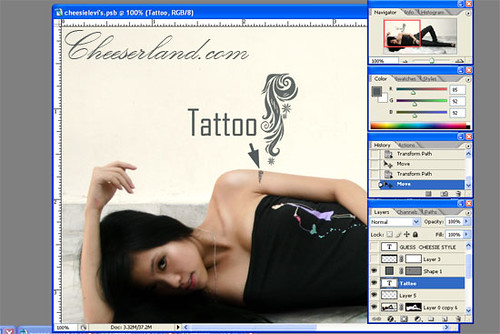
Use any brush pattern you like. It’s too small to be seen clearly anyway. Reduce Opacity to blend into the skin.
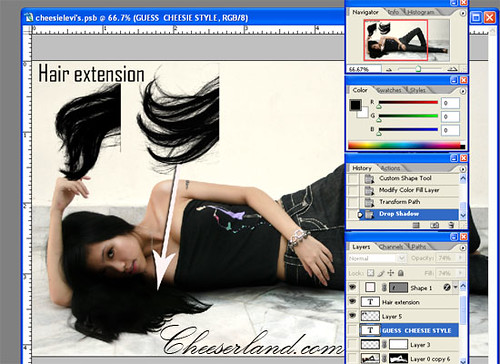
Add more hair. Choose the Hair Brush that suits your hair.
*All the brushes can be downloaded from Deviantart.
Result:
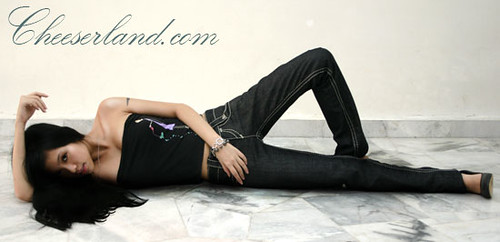
The first level of Photoshopping is completed. It’s up to you if you wanna do anything to the background.
Step 3: Background Changing
1. Remove background with the Magic Wand Tool.
2. Use the Gradient Tool to create a denim-color background.
3. Adjust color.
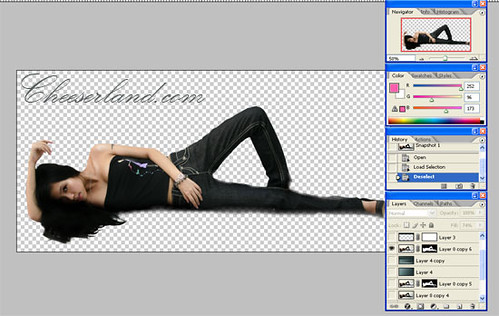
Make sure you take your picture against a plain background so it’s easier to remove the background.
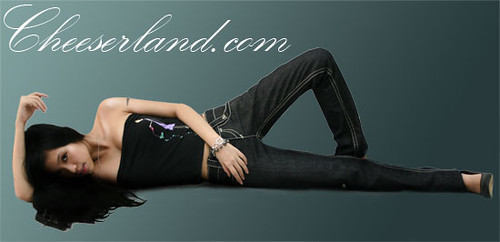
Create Gradient layer.
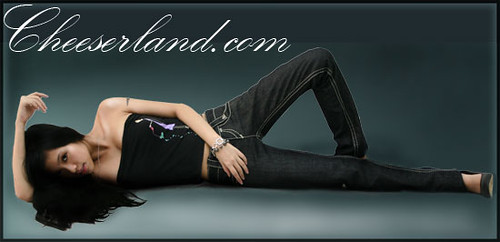
Adjust the color using Dodge and Burn to blend the gradient nicely, as well as create shadows.
Step 4: Super looooooong legs!
There are a lot of ways to do this but this is what i found the easiest.
1. Shrink the body (for extra leg room). Or you can move yourself to a bigger canvas.
2. Use Marquee Tool to select your legs.
3. Cut and Paste.
4. Streeeeeeeeeeeeeeeeeeeetch. 😀
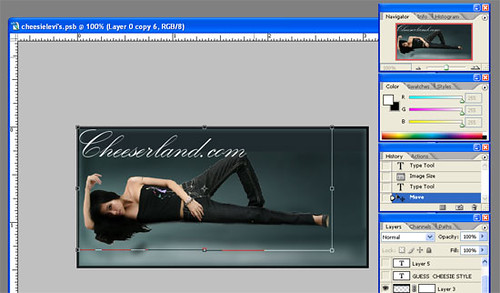
Use Transform to shrink. Make sure you press Shift while shrinking.
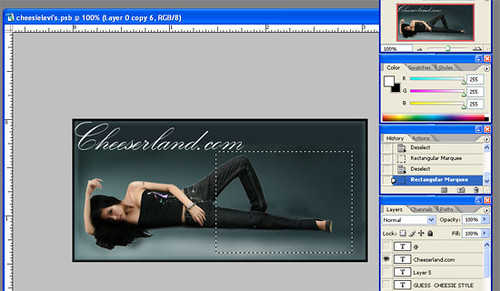
Select the part you wanna extend. Then you have to do the amputation. Muahaha.
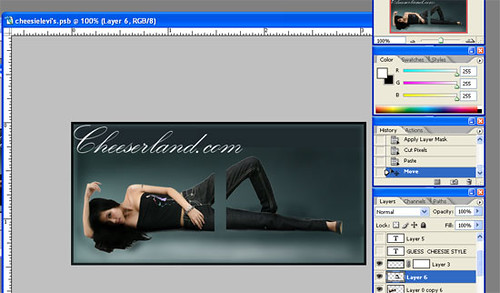
Cut and paste. Join the limbs together.
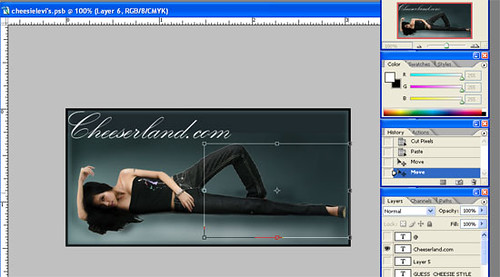
Stretch it! This part is tricky though. If both your legs are parallel, It should be no problem. However, as you can see that my left leg is bending, while you stretch it, the lower part of the left leg will become thicker (read: FAT. 0.o). Therefore, you need to do another Liquify job after stretching to slim it down.
if you the fancy super duper mega ultra long leg effect, you can cut the calves to stretch them a little more.
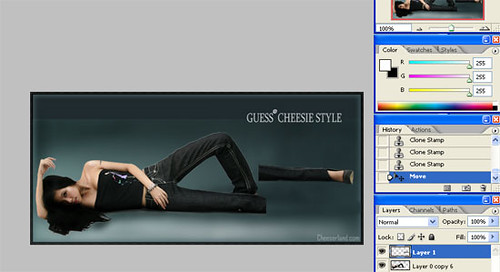
Repeat the steps.
Finally, add logo.
DONE.
The final art. Ahem.
*Enhanced picture. Balanced the leg and uhm, stretch it yet a tad longer.

(Click for larger image. Not very perfectly done though. Sleepy la.)
Well. Just to make my point.
Congrats! You are now qualified Digital Surgeons and now all of you can send your pictures to Levi’s for model application. Please send a copy to me! 🙂
If you wish to see the animated process of transformation, click HERE. Warning: Not a 56k friendly image.
One last piece of advice. Don’t photoshop too much if you can. It’s addictive and you may like what you see in your computer screen more than you do in the mirror.
P/S: Erm, don’t pester me about digital make up. It’s really easy. Just burn and dodge here and there, and some stamp tooling (i prefer that to healing brush).







First to comment? =)
PS tips! I’m learning PS, so thanks for sharing!
Thanks 4 sharing! 🙂
wahh..cheesie… i admire ur skill……Can you be my shi fu….
“can send your pictures to Levi’s for model application” = very familiar…like i type before…
!!!
OMG.
I didn’t even realise that was you in the second pic of the Jolin post until you published this. I thought you just photoshop the jeans in on top of her lah!
Karyn &Ying Bin: Sap sap sui. lol.
Clement: Wahahha. I edited the last pic a bit.
Keju: WHAT!!!666 u neber paid attention!!! *sulks* I blog very sincere one!
jeijie cheesie .. pretty pretty .. 🙂
You did it!
And i didn’t realise it was you until after the first picture!
Good job there! Hahahaha!
cool tips! i’ve always wondered about yr photoshop skills and how you come up with such nice photoshoped pictures. thanks for sharing.
Not bad lah your photoshopping! This is coming from someone who considers himself a bit of an expert in the field.
The shots with your legs detached kinda weird me out a bit though, haha.
I always knew you were sneaky, er cheesie!
Hows Cheedie?
thank you for sharing the magic behind the blog 🙂 It’s amazing to see wat a few clicks can do
Magnificent. There are a lot of people out there who make a good living doing this kind of editing. Fun to watch.
Got to learn that! Can dissect a human body as i want!
wait… am i in the wrong blog?? cheeserland turned into IT blog? wakakaz… good one, tho!
Hahahaa~~~
Cool~~!!
Bdw, Cheesie~~
I went Guess yday and most of the jeans were sold out!!
Tough Luck!!! =(
* sob sob *
Ok, i’ll go sulk now~~!!
wow~ nice photshopping skills..
thanks for sharing, haha~ looking forward to more of these ^^
Pun of the day:
A pessimist’s blood type is always b-negative.
ahhhh~ the power of photoshop.. haha.. it’s been ages since i’ve used it.. think the last time i used it was when LimKokWing was LICT and not LUCT.. haha.. yeap.. THAT long ago :p~
hmmm somecheese’s good in photoshopping! hahaha how great photoshop can be…
whoa! love ur photoshopping skills! I’m definitely picking up some tips here… thnx! =D
thnx wif the tips!!!!!!!!!!
you’re superb!
last question… do you know where can i find really good tutorials for PhotoShop thingy? esp on the digital makeup part. teehee!
That’s a pretty long process….
I like the normal length, the super long length is kind of scary looking.
I never play around with photoshop before, maybe I do so later …hehehe
great insights to the power of photoshop…haha
awsome!
ganasss. hahaha i didn’t know you could liquify those area. i have learnt something new 😛 still noob in ps.
Awesome! What program that u used?
Leaving the background up to me uh?
Ever had a Bukakke experience? 😀 LOL
Hahahaha.. very funny..
will try it out also.. thanks for sharing 🙂
YUCK…your right hand so cacat 1…
haha the before and after really got big difference wo… most ppl who post pics on web are different in real life anyways… 🙂
thanx for sharing de tips [:
Kill Photoshop! Ban Photoshop! Cause it makes legs longer.
Cheese, i can imagine how much effort you put into this thing. Damn kao time consuming ! Btw, nice cropping of bodies , i can see not much white lines =)
awesome pics..nice photoshop skill
btw,where u download those brush and how to do liquify?
mianyang: From deviantart.com. For liquify, just go to “Filter”, under which there’s Liquify. Just play around with it. 🙂
how do you get that feature on your computer?
Step One: Buy Adobe Photoshop from pasar malam.
Step Two: Load cheeserlanddot com again.
not bad ur photoshop skills…
i really admire your skills in photoshop and designing this webpage, i’ve been meaning to learn photoshop for quite some time now but have never allocated enough time to learn it.. maybe you could tutor me a thing or two…
Thanks for visiting!
I’m a huge fan of photoshop!
it’s amazing what photoshop can do for us …
wow, u’re awesome
in making picture thru photoshop…
i nvr knew how to make a photo in it
not even noe how to start wit photoshop…
hmmm, r u writing any post for photoshop novice??
pls do let me noe… thx =3
Are you Italian? You seem to be good at Fettuchop.
Wahhh!! you definitely should giv us cheeserland readers more tutorials about photoshop! im def gonna get the program now!! thx for the inspiration! 😀
gosh…photoshop…where can i download the software for free??or how much you bought the software??thank you
i don’t think THAT long legs (last picture) would look well, because your hands will only reach until your jeans pockets or something instead of your thighs :O
the legs part kind of freak me out, I’ll try it someday
OMG thats AWESOME!